
You need to manually backup OneNote. See how to do this here how to do it. (Opens Microsoft Support in a new window.)
If you have updated to the latest version of OneNote, you will not be able to backup. You must therefore also install "OneNote 2016". Microsoft has not yet made it possible to backup the latest version.
You can find the OneNote 2016 installation guide below, or you can see above how to manually backup OneNote.
Installing OneNote 2016
To install OneNote 2016, download it outside the Office suite via this link: Download OneNote 2016
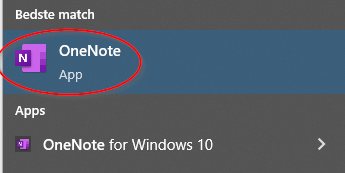
This is similar to the normal OfficeSetup installation, but will add an additional version of OneNote, simply named "OneNote" (as opposed to OneNote for Windows 10). Simply type OneNote in the Windows search bar.
Install or reinstall OneNote 2016 for Windows. (Opens Microsoft Support in a new window)